What is a thank you page?
Simply put, a thank you page is a page that website visitors are sent to directly after they’ve completed a goal on your website.
That could be signing up for your newsletter, opting in to receive your free guide or ebook, completing a purchase, reserving a spot in your webinar, etc.
Whatever the end goal is, your visitor should be directed to a thank you page immediately after completing the required action (likely filling out a form).

Why do you need a thank you page?
The most basic function of a thank you page is to confirm the action the visitor just completed (i.e. “Thanks for signing up to our newsletter!” or “Your order is confirmed”).
It’s not to just simply confirm a completed action, but also an opportunity to engage with your visitors more and ultimately, a chance to move your visitors along and deeper into your sales funnel.
But not only do you need a thank you page, you need a good one.
What your thank you page should include
First, your thank you page should include the obvious, “thank you” in one form or another (thanks, congratulations, order confirmed, etc.).
This confirms the visitor has completed the desired action.
Next, the page should include clear instructions on how to proceed. If they just signed up for a free ebook, let them know that it’s on its way to their inbox and they can expect it shortly. Or, include a clearly-stated, easily visible button that says “Download your guide”. Whatever it is, make sure the visitor knows exactly what to do.
Finally, it should include a strong call-to-action (CTA). Your CTA should be easily visible, well-defined, and move the visitor to the next step. This might be a further resource (like a blog post), checking out your product, or even just sending them back to the homepage.
To reiterate, your thank you page at the very least should include:
- Thank you (to confirm)
- Exact instructions on how to proceed
- A strong call-to-action
But, that’s just the start.
A good thank you page offers more. It offers a way to further connect and add more value. It can be an opportunity to drive traffic to other content, nurture leads, get someone to purchase something, acquire customers, and so on.
Thank you page ideas (to increase engagement & conversions):
1. Thank or confirm
I want to reiterate to actually include a thank you or confirmation message of some sort.
This should be as clear as possible. This lets the visitor know they’ve completed the required action and they can expect whatever it is they’ve signed up for.
2. Provide clear instructions
You need to make sure you actually provide the value you promised and the visitor knows how to get it.
If it’s a free guide or ebook, include a large button on the thank you page that says, “Download your free guide” so the visitor knows right away how to get it.
Or, if you’re sending it via email, tell them exactly that and when to expect it: “You will receive your free guide in your inbox shortly.” Also, think about including a contact email if they having any trouble downloading it or never receive it.
3. Restate value of original offer
Next, you want to restate the value of the original offer. If it’s an ebook, state what it is, what is included inside the book, and what the visitor will learn by reading it.
You want to make sure the visitor actually reads the ebook they just signed up for. You, or someone within your company, likely spent a lot of time creating it. Plus, it’s a chance to educate your audience and position yourself as an authority.
Also, if this free offer is part of your sales cycle, you will likely have an easier time reaching out to them if they actually engaged with your content and found it useful.
By restating the value, you can make sure they take advantage of the resource they signed up for.
4. Recommend additional articles or other resources
Your thank you page can be a great way to direct people to further content. They already found your offer enticing enough, they will likely be interested in others you have to offer.
You may consider adding some of your most popular posts (3-5) to the page or you can get a bit more specific like adding content that relates to the offer they signed up for. For example, if they signed up for a landing page optimization guide, you can direct them to your post on landing page design tips.
Additionally, if the visitor just signed up for your product or service, you may include resources on how to get started, FAQs, or other help related pages.
Finally, you may even want to consider how your thank you pages fit into your overall content strategy. For instance, you may want to create content specifically for these visitors (optees) only. This might be an article (related, helpful tips), a further free offer (like a template), or an exclusive video course. By offering an exclusive piece of content to only those who signed up, you can create a stronger connection and give the visitor a feeling of being valued.
5. Add social sharing buttons
This is a place where a lot of pages fail, surprisingly, since it’s so simple to set up.
Adding social sharing buttons to your page makes it easy for visitors to share your offer. Even if you included social buttons on your landing page, it’s a good idea to include them on the thank you page as well.
The visitor may not think about sharing until after they sign up or they may want to complete the form to see the next step before sharing with a friend or colleague.
Ideally, you want to set the social sharing buttons to share the original landing page and not the thank you page.
6. Invite them to follow you on social media
This too is another simple one that I’m surprised more companies don’t implement. The visitor is already engaged with your content and your company. Thus, they are much more likely to follow you on social media.
By simply including a few links to your social media profiles (choose a select few, don’t list every single network out there), you give the visitor a chance to easily follow your brand and get updates on your new content.
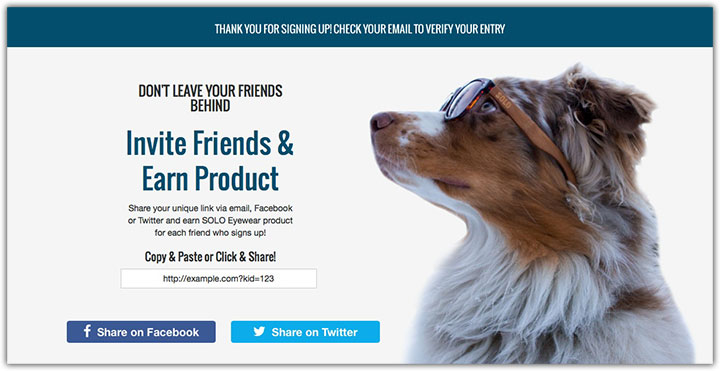
7. Refer (Tell) a friend bonus
This method was instrumental in helping Dropbox grow to the hugely popular cloud storage platform it is today. The idea, essentially, is to offer the visitor extra value for referring a friend and getting them to sign up too.
In Dropbox’s case, they offered (and still do) additional storage space for free if you referred a friend and that friend signed up for a Dropbox account.
This created a viral campaign that helped Dropbox explode in popularity.
However, it’s a strategy that you could implement into your thank you page. By simply offering added value (like a coupon code, free sample, extended free trial, extra credits, even additional free content) in turn for referring a friend, you encourage the visitor to share your offer, engage with your company more, and get some “free” promotion in the process.
8. Include social proof
By adding positive testimonials (from real people, don’t make them up), the visitor can get real feedback and confirm they’ve made the best decision.
If your offer was a free ebook, then include some testimonials from people who read it and found it useful. This lets the visitor know it’s worth reading.
You may also include testimonials about your business (like how great your customer service is) or product as a whole. This can encourage visitors to move further along in your sales funnel and check out your product.
9. Add comments
It may not be the first thing that comes to mind, but adding comments to your thank you page can be another way to engage visitors.
Let’s say you’re offering a free ebook, by allowing comments on your thank you page, you can give readers the chance to comment what they thought of the book, share their own ideas, or ask questions.
Just be sure to provide some text encouraging visitors to comment and allow them to come back to the page so they can comment later.

10. Ask to sign up to newsletter
If your opt-in process did not automatically add visitors to your email newsletter, then this would be a good time to do so.
They already find your content useful and are engaged with your company, by simply including a signup form for your email newsletter, you can get additional signups and grow your list.
11. Add to calendar option
If you’re offering a free webinar, or maybe even a free event, adding an “add to calendar” option on your thank you page is a must.
Often, people can sign up for a webinar and never actually attend. They get caught up and forget all about it.
However, adding an “add to calendar” option, for say Google calendar, can ensure the event is put on their schedule and they won’t miss it.
12. Sign up for a webinar
If you offered a free piece of content like a guide or ebook, you could also include a related webinar you have on your thank you page.
The visitor already found your content useful and enticing enough, they will be much more likely to sign up for your webinar add this point.
13. Create an account
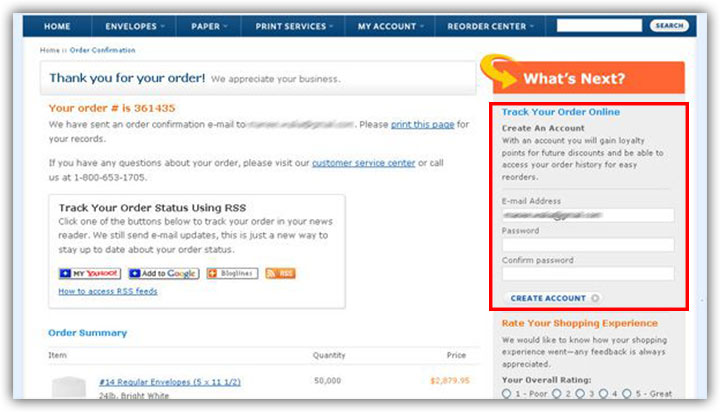
If your visitors landed on a thank you page because of a purchase they just made, then this can be a good time to get them to sign up for an account for your site.
For instance, if you’re an e-commerce site, you may include a form for visitors to create an account immediately after purchase (if they did not create one during the buying process).
However, make sure to educate them on the value of doing so. You may include something on them having the ability to check the status of their order, see tracking info, or earn rewards. This will make it more likely they’ll sign up.